Calibration Quality Gates
Depth is reconstructed from the camera calibration, so a bad calibration poisons the depth and every solve built on it — quietly, and without ever failing outright. Two gates sit upstream of processing to catch that: one when the calibration is solved, one when a take is about to consume it. Neither gate deletes anything. Both pause and wait for you.
Where the gates sit
Gate 1 judges the calibration on its own terms: is this a self-consistent solve of the checkerboard take? Gate 2 judges it against the take that wants to use it: does this calibration actually describe the two cameras as they were when this footage was shot? A calibration can pass the first and fail the second — that is the whole point of having both.
Gate 1 — Out-of-sample validation RMS
When a Calibration job finishes, the solve is scored on frames it was not solved from. Its own solve error is not used for the verdict: a calibration built from a handful of convenient frames can drive its training error down while describing the rig badly, so ranking by training error rewards exactly the overfit solves the gate exists to catch. Out-of-sample error does not have that blind spot.
Default 1.0 Upper bound on validation reprojection error, in pixels. Above it, the calibration is set aside and the job pauses as Poor Calibration. This is our convention — Epic ships no equivalent default.
Gate 2 — The footage diagnostics gate
Before a stereo performance take generates depth, the calibration it discovered is scored against a sample of that take's own footage on Epic's 0-1 diagnostics scale. The check runs at preflight, ahead of depth generation, and its result is cached for the session.
Default 0.5 Minimum diagnostics score for the discovered calibration on this take. Below it, the take pauses as Poor Calibration before any depth is generated.
This score is a structural check, not a quality ranking. It answers one question: can this calibration relate the two camera views of this footage at all? It reliably catches calibrations that are structurally wrong — a wrong-route or broken solve scores around 0.2 — but it cannot tell a good calibration from a slightly worse one, and will happily score a mediocre solve a hair above a better one. Leave it as a safety net; tightening it will not buy finer discrimination, it will only start rejecting healthy takes.
What a low score actually means
- The wrong grid take. The discovered calibration belongs to a different rig configuration or a different shoot day than this take.
- The cameras moved. The HMC was adjusted, knocked, or re-mounted between the calibration take and this performance — the solved geometry no longer describes the rig.
- The wrong actor folder. Discovery walked up into a shared parent and found a neighbouring actor's calibration. Keeping each shoot under one actor folder prevents this.
- No stereo features matched at all. A distinct message from a merely low score — usually swapped or mismatched camera views, or footage the calibration cannot possibly correspond to.
When a job pauses
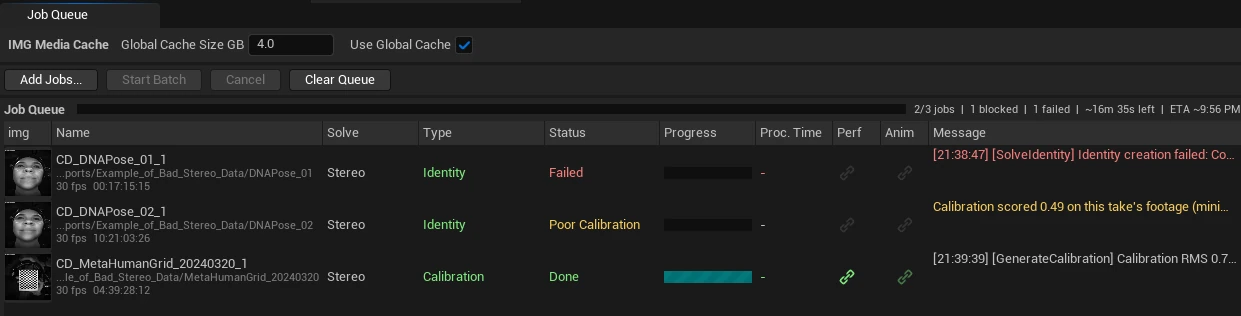
Both gates produce the same blocked status — Poor Calibration — but from different places, and they clear differently:
Calibration job The calibration solved but exceeded Max RMS Error. The asset is unlinked from the take and added to the rejected list, and its artifact is marked Partial. The job's status message reports both the solve and validation RMS against the threshold. Clears by Accept Calibration Anyway — which relinks the asset, marks the job Done and wakes its dependents — or by a better re-solve, which un-rejects the path automatically.
Performance take The discovered calibration scored below Min Score on this take's footage. Nothing is rejected — the calibration may be perfectly good for other takes. Clears by linking a different calibration, re-running calibration (the take requeues automatically once a better one exists), or Accept Calibration Anyway, which records the decision on the take and lets it proceed with the calibration it already has.
Accept Anyway is available from the queue's right-click menu whenever a selected job is paused on quality, and accepts multiple selected jobs at once. It is a deliberate override, recorded durably — the accepted decision survives requeues and manifest reloads.
Board override and presets
Most quality failures are really detection failures: the board dimensions were wrong, so the frames that survived selection were the ones that happened to fit a wrong model. By default the plugin assumes Epic's shipped board — 11 x 16 squares at 0.75 cm, measured in squares, not inner corners — and auto-detects the pattern per take.
Default off Turn on for a non-Epic board. Your board width, height, and square size are then pinned verbatim — only those dimensions and their swapped orientation are tried, and auto-detection never writes back over them.
Related
- Global Settings -> Stereo Calibration — every calibration setting with its default, including the two gate thresholds.
- Stereo Workflow — the calibration -> identity -> performance chain and the other blocked states.
- Troubleshooting — stuck, blocked, and failing jobs.