Ingest & Add Jobs
Every footage job runs on a UFootageCaptureData asset. Getting raw footage into
the project as that asset is ingest, done by Epic's Capture Manager. Getting assets into the queue is
Add Jobs..., the single entry point in the MHA Manager toolbar — or the
auto-queue watcher, which needs no dialog at all.
Where takes come from
Raw take folders on disk are ingested from the External Footage source of the
Add Jobs dialog below, inside the editor (UE 5.8). Takes that Capture Manager has already
ingested - from this dialog, or from Epic's own Live Link Hub - land under
/Game/CaptureManager/Imports/<Actor>/ as UFootageCaptureData
assets and are queued from Project Assets or by the auto-queue watcher.
A single-camera take that arrives carrying its own depth - a mobile device running Live Link Face, or any other depth camera - is queued as a Depth job when its calibration came with it, or Other when one still has to be found. Both need a prepared Identity for the actor, the same as Stereo. Turn off Depth solve for depth takes in Global Settings to queue them as Mono instead.
Auto-queue on ingest
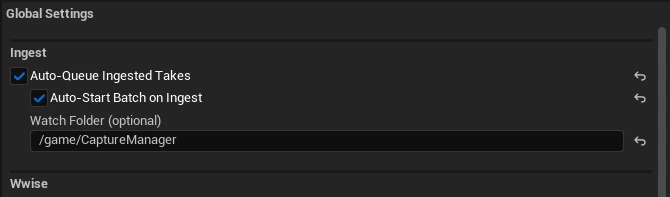
As Capture Manager delivers takes, the Ingest section of Global Settings can watch the project and queue them the moment they appear in the Content Browser — no dialog needed:
/Game/CaptureManager/Imports. Empty watches everywhere under /Game. The three sources

FootageCaptureData asset already in the project. The default panel. CaptureManagerEditor plugin; on UE 5.7 the source is disabled and its tooltip says why. Project Assets
Every FootageCaptureData asset in the project, shown as a tree that mirrors its
content path — so an Imports/<Actor>/<Take> layout reads as actor
folders with takes underneath. Search filters the tree, checkboxes pick takes (a folder
checkbox toggles everything under it), each row is labelled Stereo or Mono, and the footer
counts what is checked against the total. Double-clicking a take queues just that one.
Show thumbnails (below the source picker, off by default) adds a first-frame preview to each row. It is off because decoding a frame per take is slow on large projects; thumbnails are only decoded once the box is ticked.
Each checked take becomes one job, typed automatically: path-name tokens classify
grid/calib as Stereo Calibration and identity/dna
as Identity Create, while Mono and Stereo come from the asset itself. See
Naming Conventions for the
patterns and Job Types for what each
one does.
Audio
Audio jobs need no footage, no calibration, and no identity — a voice track is the whole input. Three sub-sources feed them:
Whichever sub-source is active, the preview list below it is the same: every discovered item with a checkbox, a check-all toggle, and a checked count. Items already in the queue are skipped, so re-running against the same folder adds nothing.
External Footage
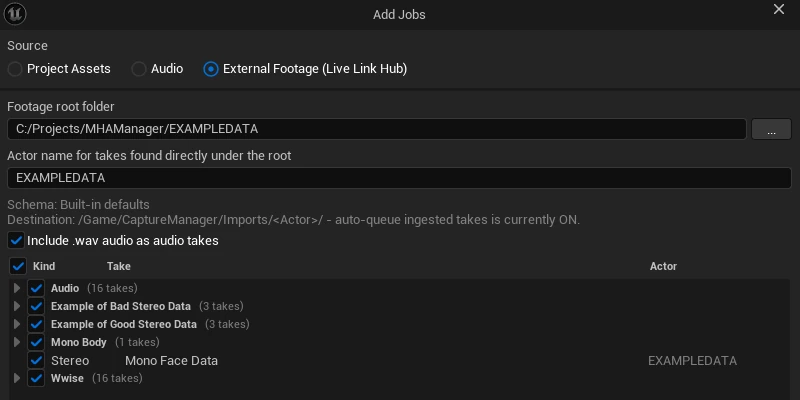
For footage that is not in the project yet. Point the dialog at a footage root on disk; it
walks the folder and classifies every take it finds. Check the ones to bring in and press
Ingest: Capture Manager's ingest library runs in this editor process, one
actor at a time, into /Game/CaptureManager/Imports/<Actor>/. The checked
takes are queued when the ingest finishes, including takes that were already in the project.
- Set a Media Directory in Project Settings -> Capture Manager first; the ingest refuses to start while it is empty. Other Capture Manager settings apply as usual.
- A notification counts finished takes (there is no progress within a take) and has a Cancel button. Per-take results are in the Output Log under
LogMHAManager, lines startingMHACaptureManagerIngest:. - One ingest at a time: a second is refused until the first finishes or is cancelled.
Takes the engine would silently drop are still listed, greyed out with the reason — so a mislaid take shows up as a problem instead of just going missing. The actor for each take comes from its folder depth (see the schema below); takes that sit too shallow to carry an actor segment fall back to the dialog's fallback actor field.
Describing your footage layout
Out of the box, the scan assumes each take is a folder, its parent folder names the actor,
and footage is .mp4 or .mov. If your stage lays footage out
differently, ship the rules alongside it: drop a file named
MHAIngestSchema.json at the footage root and the dialog picks it up
automatically, reporting which rules it used.
{
  "version": 1,
  "path_template": "{actor}/{session}/{take}",
  "video_extensions": ["mp4", "mov"],
  "stereo_patterns": ["*_top", "*_bot"]
}version 1 Schema version. Anything other than 1 is refused; the built-in defaults are used and the dialog shows a warning. path_template {actor}/{take} Matched from the end of the path: {take} is always the last folder, and only {actor}'s distance above it matters. {actor}/{take} therefore means "the take's parent folder", however deep the root is; an Actor / Session / Take stage ships {actor}/{session}/{take}. Leave {actor} out entirely and every take uses the dialog's fallback actor. video_extensions ["mp4", "mov"] Which file extensions count as footage. Leading dot optional, case ignored. stereo_patterns (empty) Wildcards that a folder's two video base names must match, one each, for the folder to count as a stereo take — e.g. *_top and *_bot for a top / bottom head-mounted rig. Case is ignored. Empty accepts any folder holding exactly two videos, the same rule the engine's own auto-discovery uses. What happens to a queued take
However a take enters the queue, it is classified automatically and readied to process:
- Its job type is derived from the take — path-name tokens drive
grid/calib-> Stereo Calibration andidentity/dna-> Identity Create, while mono / stereo / audio come from the asset itself. - Mono takes get a first-frame framing probe that auto-enables body tracking when the whole body is in shot.
- Dependent assets (calibration, identity) are auto-discovered where the folder layout allows, so a stereo take lands ready or clearly marked for what it still needs.
grid, calib, identity, and dna out of
folder and take names that are not those take types — those tokens drive
classification, and a misnamed performance take will be queued as the wrong job. See
Naming Conventions. Once jobs
are in the queue, Per-Job Options
covers what you can change per take before starting the batch.